On this page
If you've spent any time working with Azure Storage Accounts, you've likely noticed that file storage capabilities are exposed through two distinct endpoints: blob and dfs.
It is incredibly common to assume those two endpoints are just alternative URLs routing to the exact same bucket of data. In reality, the blob and dfs hostnames expose entirely different APIs. Hitting the wrong one fundamentally changes how Azure processes your requests under the hood, which can quietly throttle your query performance and inflate your monthly bill.
Even if you rely on massive data platforms like Databricks or Snowflake to handle your compute, the moment those engines need to actually read, write, or delete your files, they still have to pass through these underlying APIs. Understanding the differences between them is a very useful reference point whether you are architecting a custom solution, debugging a slow job, or trying to cut your cloud costs.
To build that intuition, we need to look at what actually happens beneath the URL. Here is a breakdown of how both APIs process physical directories, handle heavy read/write operations, and meter your cloud spend.
Endpoint Basics: Two URLs, Two APIs #
Every Azure Storage Account URL is constructed from three distinct pieces: your unique storage account name, the endpoint type, and the core domain.
For the two storage endpoints that we discuss, the URLs look exactly like this:
https://<storage-account-name>.blob.core.windows.nethttps://<storage-account-name>.dfs.core.windows.net
That middle section—the endpoint type—is the crucial puzzle piece. It is not just a cosmetic DNS label; it explicitly dictates the API surface exposed by your storage account.
This means that you can't use them interchangably. If we build a client application or pipeline using the Blob API, it must call the blob endpoint. Conversely, if we are using the Data Lake API, it must hit the dfs endpoint. Sending a Blob API call to dfs URL will result in a failure.
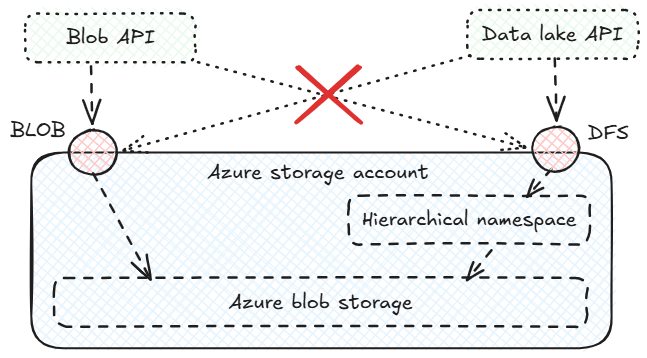
So, an endpoint choice boils down to which API we want to use for our integration. Let's dive into how these two APIs handle data-related operations.
Flat vs. Hierarchical Namespaces #
Truth be told, the way these APIs handle namespaces - specifically, whether physical directories actually exist - is the single most important architectural difference between them. It is the root cause of every performance, billing, and security detail we are about to explore.
- Blob API (The Flat Namespace): The Blob API treats your storage account as a massive, unstructured bucket of objects. While you can include slashes (
/) in your blob names to make them look like they are inside folders (e.g.,data/2026/sales.csv), those folders do not physically exist. The storage engine only sees one long, flat string prefix. - Data Lake API (The Hierarchical Namespace): When we use the
dfsendpoint, we are interacting with a genuine, physical filesystem. By enabling the Hierarchical Namespace (HNS) feature, directories become real, tangible objects within the platform, just like folders on your local laptop.
Data Read Operations #
For smaller datasets with low file counts, the time spent locating data is practically irrelevant. However, when big data engines like Apache Spark or Presto query massive, highly partitioned datasets, their initial performance is heavily gated by how quickly they can traverse storage to locate the target files.
Because the blob and dfs endpoints rely on entirely different underlying architectures - a flat, string-based namespace versus a physical directory tree - they execute this critical search phase in two fundamentally different ways:
Blob API (
ListBlobsmethod): When an engine tries to find specific data (likeyear=2026/month=05/), it sends aListBlobsrequest. Because there are no real folders, the API cannot simply open a '2026' directory and look inside. Instead, it returns a massive, flat list of every single file path in your storage account. If you have millions of files, the API can't even send this list all at once. The compute engine is forced to continuously ask Azure for the next page of results, scanning endless text strings top-to-bottom just to figure out which files actually match your query. It is a massive waste of time and compute resources.Data Lake API (
Path/Listmethod): Because thedfsendpoint understands physical hierarchy, the engine avoids downloading massive, irrelevant lists of file paths just to figure out what exists. When it issues aPath/Listcommand, it queries the target folder directly. The API instantly returns a short list containing only the actual sub-folders inside (for example, just returningmonth=01throughmonth=12). The compute engine doesn't waste time splitting millions of text strings by the/character to guess how your data is organized. It gets exactly the sub-folders it asked for and immediately knows where to look next.
This ability to skip the process of downloading and parsing millions of long file paths is exactly what allows big data engines to execute lightning-fast data reads across a massive amount of files. Because the hierarchical namespace enables true partition pruning, the compute engine can instantly navigate down specific branches of the directory tree—for example, jumping straight into year=2026/—and entirely ignore the rest of your historical data. Without it, your expensive compute clusters are reduced to brute-forcing massive text scans every time an analyst writes a simple WHERE clause. Hence, for heavy analytical reads, the Data Lake API is much better suited than the Blob API.
Moving and Archiving Data #
Managing the lifecycle of source data as part of the ingestion process often requires physically moving directories. One of a commonly used patterns is ingesting raw source data into the staging directory, and once it's processed, moving it further to the archive directory. This ensures our data pipelines don't accidentally re-process the exact same batch on the next run.
Let's look under the hood. When we execute such a move, it basically boils down to a "rename" command. Your choice of endpoint turns that simple rename into either a millisecond metadata update or a multi-hour bottleneck.
- Blob API (The Copy-and-Delete Cycle): Because the Blob API simulates folders using string prefixes, it cannot actually move a directory. If you issue a command to rename
/staging/batch_1/to/archive/batch_1/, the storage engine is forced to individually copy every single file to the new string prefix, and then individually delete every original file. If your staging directory contains 100,000 files, a simple archive command triggers well over 200,000 API calls. At first the engine needs to run paginated listing commands just to find the files, followed by 100,000 individual copies and 100,000 individual deletes. - Data Lake API (The Pointer Update): Because the Data Lake API uses a true physical filesystem via the
dfsendpoint, a directory is an explicit object with which you can interact directly. When you rename a folder from/staging/batch_1/to/archive/batch_1/, the storage engine doesn't physically touch the files inside at all. It simply updates a single metadata pointer in the directory tree. Whether that batch holds ten files or ten million files, it doesn't matter whatsoever. The whole renaming process is completed within just 1 API call.
By leveraging the Data Lake API, you completely bypass the massive copy-and-delete bottleneck. It allows you to instantly archive and manage the lifecycle of your source data without keeping expensive compute clusters running just to babysit a massive chain of duplicate-and-delete API calls.
Atomic vs. Chunked Transactions #
Choosing an endpoint influences the way you're billed for data reads and writes. Azure transactions are billed based on the number of API requests made, but the two APIs calculate these requests differently for large files.
- Blob API (Atomic Transactions): When calling the Blob REST API directly, you control the chunk size. To upload a large file, you simply slice it into massive blocks—usually up to 100 MB each—and send them via individual
Put Blockrequests. Because the Blob API bills strictly per HTTP call, a 1 Terabyte file upload requires roughly 10,000 transactions. At the standard Azure rate of ~$0.065 per 10,000 writes, that entire 1 TB upload costs you about $0.06 in API fees. - Data Lake API (4 MB chunks): Costs for Data Lake API read/write operations are measured differently. They're billed per every 4 MB of data. It doesn't matter how large the actual payloads of HTTP requests are. Azure's billing engine partitions total data volume into 4 MB billable units. Uploading the exact 1 TB file via the
dfsendpoint generates about 262 000 billable transactions. The standard transaction fee reaches about $1.70.
Is this cost difference actually a big deal? It depends entirely on your workloads.
If you are running a heavy analytical pipeline, spending an extra $1.70 to write a Terabyte of data is probablt not a big deal. Actual compute time is likely far bigger expense than associated storage fees. If the Data Lake API's instant partition discovery saves your engine from scanning millions of text paths at the start of a query, and its instant directory renaming prevents your cluster from hanging for hours at the end of a job, you easily save hundreds of dollars in compute time. Paying a $1.70 transaction "tax" to unlock those massive read and write performance gains is an absolute no-brainer.
However, if your workload revolves around archiving 1 000 Terabytes (1 Petabyte) of raw video files a month, the math changes entirely. The Data Lake API's strict 4 MB billing meter would generate hundreds of millions of write transactions, resulting in $1,700 Azure bill, with basically no architectural benefits. For such a workload, Blob API costs would be around $60, around 28 times less.
Access Control Granularity #
The Blob API handles security via container-level RBAC, whereas the Data Lake API uses POSIX-style ACLs to lock down individual directories and files. However, if your platform already isolates different teams or workloads into completely separate containers or storage accounts, this granular folder-level security becomes entirely redundant. You only need the Data Lake API's advanced security model if you need to isolate permissions within a single containers. From the security perspective though, it's never a bad idea to be able to accommodate permissions as granularly as possible.
The Cost of Enabling the Data Lake API #
To unlock the Data Lake API and all of its performance benefits, you must enable the Hierarchical Namespace (HNS) on your storage account. However, you can't just treat this as a free performance upgrade.
Even though turning on HNS technically allows you to still use the Blob API alongside the Data Lake API, it is not a magical "best of both worlds" scenario. Enabling HNS is a permanent architectural shift for your entire storage account. Before you commit to the Data Lake API, you must weigh these infrastructure trade-offs:
- It’s a one-way door: Once enabled, you cannot turn HNS off. Reverting requires provisioning a brand-new storage account and physically migrating your data.
- Loss of native Blob features: Enabling HNS instantly strips away a few Blob storage features. For example, you completely lose the ability to use Point-in-Time Restore for your containers, you break compatibility with the standard Azure Backup Service and you can no longer use Premium page blobs.
Which endpoint/API should I use? #
If your priority is big data analytics, and you'd benefit from partition pruning and instant directory renames, enabling HNS and leveraging the Data Lake API seems like the best option. Cost savings associated with data operations are just too massive to ignore.
On the flip side, if your workloads revolve around passively archiving petabytes of raw data, or your disaster recovery strategy relies on native Azure Backup, you should probably keep the namespace flat and stick to the Blob API. For these use cases, out-of-the-box compatibility and drastically lower transaction costs for large file uploads make it simply the better choice.
And if your platform handles a mix of both, don't force a one-size-fits-all approach—provision HNS-enabled accounts for the workloads that actually need them, and stick to flat namespaces for the rest.