On this page
Let's be honest: Azure Storage Account pricing feels as if it was purposefully constructed to make you confused. When we start to build our data platform, it's quite common to treat cloud storage as a cheap dumping ground, since data retention costs are still drastically cheaper than storing everything inside a database. But once your data volume scales, that monthly invoice can quickly get out of hand.
As a result, choosing the best storage tier for your specific workload is frustratingly difficult. We are forced to navigate a confusing mix of base capacity rates and hidden operation fees. Instead of just calculating the cost per gigabyte, we have to predict exactly how often our pipelines will execute read and write requests. Balancing cheap storage against expensive access penalties turns what should be a simple architectural choice into a mathematical nightmare.
Evaluating Optimal Storage Tiers #
Because figuring out the exact cost is so difficult, making a definitive call on which tier to choose usually makes us follow one of the five distinct paths:
Choose once and forget: We provision a storage tier on day one and never look back. It is the easiest path, but it leaves massive amounts of money on the table as our data ages and our workloads mature from POCs to production grade solutions.
Use standard lifecycle rules: - We configure native Azure Lifecycle Management policies to automatically shift tiers or delete data based on age or last access time. The problem here is that this approach offers absolutely zero flexibility. Instead of optimizing for actual costs, these policies rigidly follow whatever day threshold we guessed straightaway. They blindly move or delete the data without ever checking if that hardcoded rule actually saves us money or just triggers expensive operational penalties.
Create custom logic: We spend expensive engineering hours (and a lot of tokens) building scheduled monitoring pipelines that dynamically change the lifecycle based on our own custom criteria. But let's be real—this code is inherently brittle because it's hardcoded with very specific assumptions about our usage. Upon inevitable workload changes, the pipeline fails its only goal of actually securing the optimal cost. The only way to prevent this failure is to spend a ridiculous amount of engineering time practically embedding the entire Azure pricing calculator right into your codebase.
Choose smart monitoring: We rely on native automated smart tiering. As much as it can sound like an optimal choice, it comes with its own set of problems, which I'll unpack in the next article.
Revisit manually: We review our storage tiers once in a while based on current workflow details and change the tiers manually. Truth be told, this can be quite tedious, requiring us to build complex spreadsheets and run endless manual calculations just to verify if the switch will actually save us money.
The Pricing Puzzle #
None of these options for controlling tiers is flawless. Regardless of what we choose to go for, the underlying pricing structure makes optimizations quite a headache.
On paper, it should be straightforward - you just find the optimum storage tier based on your data volume and access patterns. Frequently queried data stays in the Hot Tier, while the rest gets pushed to the Cool Tier or Cold Tier.
But the actual math required to balance cheap retention rates against expensive operation fees makes it incredibly frustrating to pinpoint the optimal setup for your architecture. Even when you know the exact parameters of your workload, figuring out the specific break-even point is exhausting. If your scheduled pipeline executes read operations exactly twice a month on a few hundred gigabytes of parquet files, does the cheaper capacity of a colder tier actually outweigh the retrieval penalties? Answering that simple question requires complex mathematics.
The Solution - Storage Tier Cost Calculator #
That mathematical headache is exactly why we built our free Azure Storage Tier Cost Calculator.
Whether you are looking for an Azure Blob Storage pricing calculator to model standard flat namespaces or an Azure Data Lake pricing calculator for ADLS Gen2 workloads, this tool handles the complexity for you.
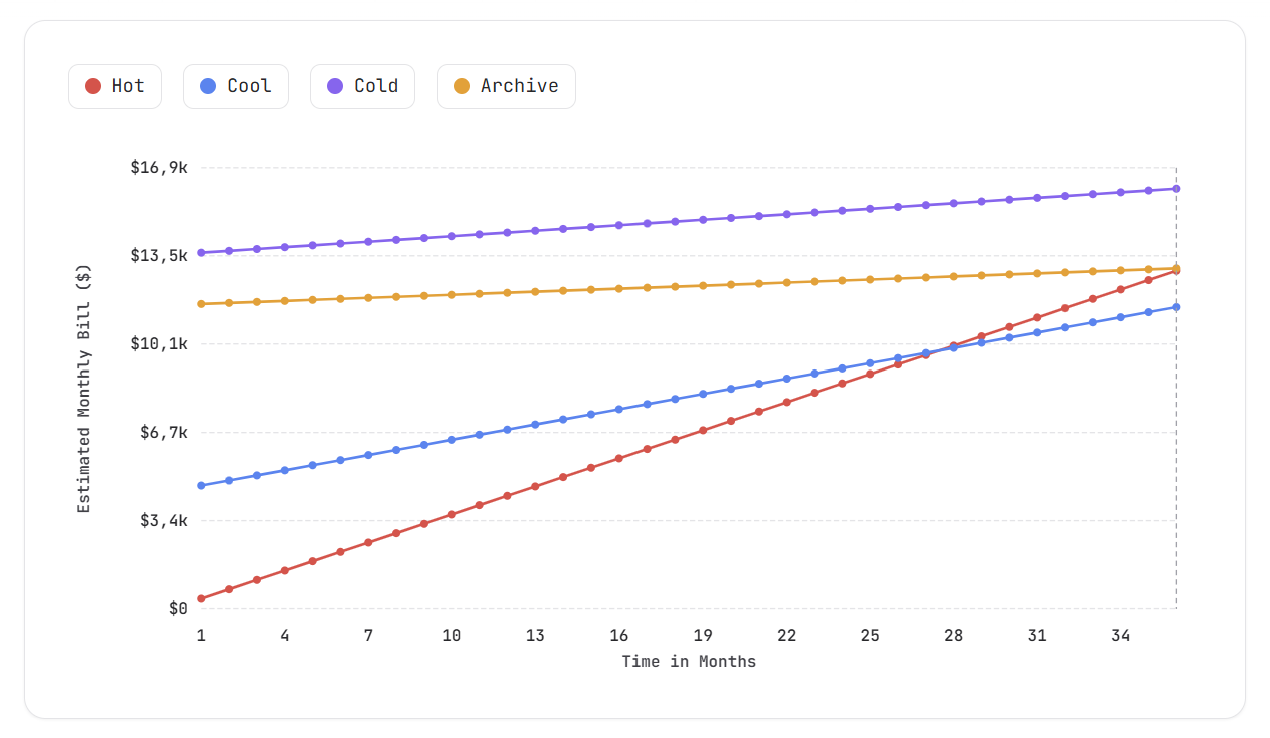
Instead of forcing you to build a custom pricing model from scratch, you just drop your expected parameters straight into the tool. It applies the underlying Azure pricing rules automatically and gives you a detailed, visual breakdown showing exactly which storage tier is the best option for your specific workload.
We built this tool to handle the exact underlying mechanics that make Azure pricing so annoying. Because your total cost is driven just as much by data retrieval and ingestion rates as it is by static data volume, the tool lets you test your architecture across a few key dimensions:
Flat vs. Hierarchical Namespaces: Toggle between standard Blob storage and ADLS Gen2 to accurately calculate how
readandwritetransactions are chunked differently. (If you want to explore the mechanics behind this, we wrote a full breakdown on what Azure's Blob and DFS endpoints actually do differently).Cost Over Time: Track cumulative monthly expenses as your data grows, visually mapping out your storage runway over a fully adjustable simulation timeframe.
Read Volume Impact: Map the exact tipping point where frequent queries turn cooler tiers into a massive net loss, helping you spot retrieval fee penalties before they happen.
Granular Workload Inputs: Dial in highly specific metrics including your Simulation Timeframe, Initial Data Volume, Write / Month, Read / Month, Average File Size, Upload Block Size, and Files per Directory to see how your physical folder structure actually impacts your API bill.
Note
The Bottom Line #
Optimizing cloud storage shouldn't require a degree in accounting. While Azure Storage gives us incredible flexibility, balancing the actual math of capacity versus operations is an exhausting exercise. The Azure Storage Tier Cost Calculator handles that heavy lifting for us. We can finally stop relying on trial and error, and confidently configure our storage to remain cost-effective as our data volume grows.
But what if you don't want to calculate anything at all? What if you just want Azure to move the files for you automatically based on real-time usage?
In the next article, we will discuss native Smart Tiering - how it works, when it is a brilliant choice, and when it can become an even bigger budget drain than managing your tiers manually.